Automations
Automations in the project is where tests run without anyone clicking "Test new version": on a push, on a pull request, on a schedule, or from your own CI. It also holds the project's API tokens, "Re-runs by the platform", and online scoring and alerts.
What an automatic run does
Every automatic run of the project's tests, whatever started it:
- pre-runs first, then tests every confirmed test (when each scenario runs once and has only its normal condition, the run itself is the pre-run). Each scenario runs as many times as the pass criteria need (their highest "Runs per test"), or once if they set nothing; each test set runs as many times as it says itself;
- becomes one experiment, judged by the release gate;
- runs as the person who switched it on, or who made the API token, and is billed like a run that person started by hand;
- mails that person when it ends, with the verdict and a link (parts started together send one mail).
If its pre-run fails on a project connected to a GitHub repository, the platform first fixes the test connection, with at most 10 checks in all (see the pre-run), and the run goes on once one passes. If it can't, or on any other project, the run ends there and a single mail says why. The next push, schedule or API call can still start a run.
A project runs one test at a time. An automatic run that finds another test queued or running isn't started, and neither is one the platform refuses for another reason (a test runner offline, a used-up balance). The person it would have run as gets a mail saying why, at most once a day per project and reason; a schedule also shows the reason under it.
Runs you start by hand send no mail.
Push and pull requests
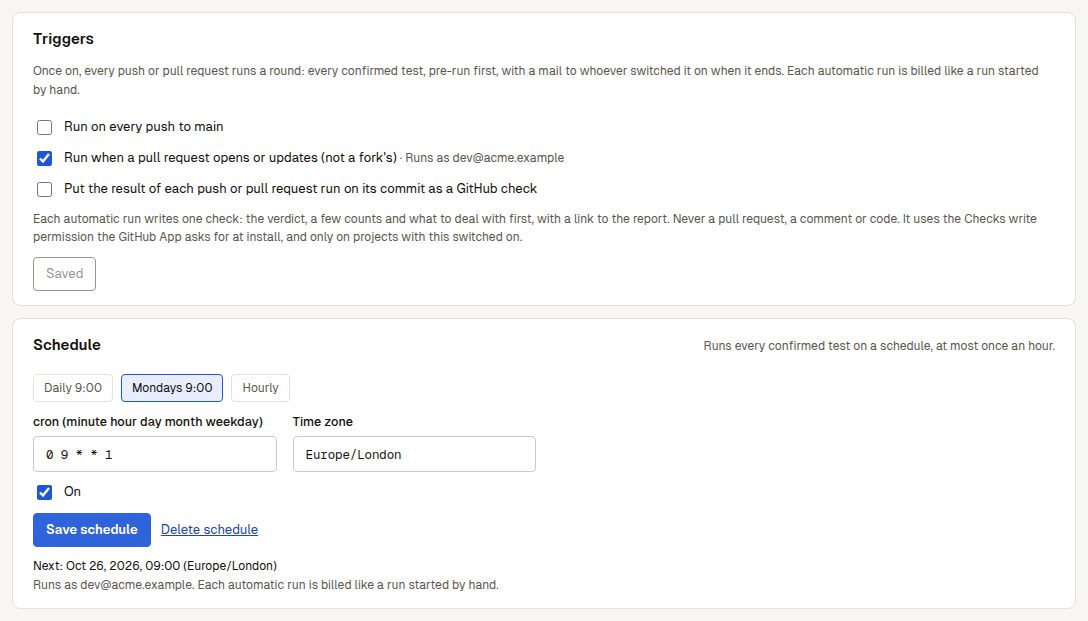
This is only for a project connected to a GitHub repository. Open Automations and go to "Triggers". Once a check passes, the "Connect a GitHub repository" wizard also ends with a link here.
- Tick what should start a run:
- "Run on every push to main" (it names the branch you bound): tests the pushed commit.
- "Run when a pull request opens or updates (not a fork's)": tests the pull request's head commit when it's opened, updated or reopened. A pull request from a fork doesn't run.
- "Put the result of each push or pull request run on its commit as a GitHub check": see below.
- Click "Save". Each switch says whom it runs as: "Once saved, runs as you", or the person who switched it on.
A commit is tested once per project, however many pushes and pull requests carry it.
A push or pull request that comes while the project is running another test or check (a project runs one at a time) isn't lost: it waits in line and starts by itself once the project is free (the platform looks every minute), with no need to push again; with the checks switch on, its commit first gets a "Queued" check, which becomes the round's check once it starts. If the pull request is closed, a newer commit comes (that one is tested), or the switch is turned off while it waits, it isn't tested, and the check says why; after 6 hours without the project coming free, it stops waiting. Under "Triggers" the pushes and pull requests GitHub sent in the last day are listed, each saying whether testing started (with a link), it waits in line, or it wasn't tested and why. A pull request you just opened that isn't in the list hasn't been sent to the platform by GitHub yet: refresh in a minute or two, and push again if it still isn't there.
GitHub checks
With the checks switch on, each push or pull request round writes one check run, named Preworld Review, on the commit it tested. It shows as in progress from the start and completes when the last part of the round ends, with the round's release gate:
| Conclusion | When |
|---|---|
| success | The gate passed and every part of the round finished |
| failure | The gate blocked |
| neutral | No gate rules, or a part didn't finish and nothing broke for sure |
The check holds the gate's table (each scorer's average, its change against the baseline, rows improved and regressed, each rule with its actual value), the top problems to deal with and a link to the experiment. It never includes the agent's output, an attack's text or a secret. A pull request round also posts the same table as one comment on the pull request, updated on every round (never a second one). The comment uses the App's Pull requests: Read and write permission; an installation made before the App asked for it keeps Read until an owner of the GitHub organization accepts the App's permission update on GitHub, and until then the round gets the check alone, the check saying what it takes to have the comment too. The platform doesn't open pull requests or change code.
The check needs the GitHub App's Checks write permission. The App requests it at install along with its other permissions, and the platform uses it only on projects with checks switched on. If your installation is older than that permission, an owner of the GitHub organization has to accept the App's permission update on GitHub. Until then, or when GitHub refuses to write the check (403 or 404), the page says so and automatic runs go on without a check. The App's permissions are in Connect a GitHub repository.
To gate a workflow of your own instead (or as well), see CI and the GitHub Action.
Schedule
Open Automations → "Schedule".
- Pick "Daily 9:00", "Mondays 9:00" or "Hourly", or write your own under "cron (minute hour day month weekday)".
- Set the "Time zone" (Europe/London by default), such as
UTCorAsia/Shanghai. - Click "Save and turn on". Until then there is no schedule: the section says "No schedule yet", nothing is filled in for you, and an unsaved change says so.
A schedule runs at most once an hour: its minute field must be a single number, such as 0. Above the form you see "Next: …", "Last: …" with "See that run", and whom it runs as. Times missed while the platform was down make one run, not one each. Untick "On" to pause it, or click "Delete schedule" to remove it.
On a chat AI project, every confirmed test set goes to the chat AI the project connected. With several chat AIs connected the run is refused, so keep only the one to test.
API tokens
A project API token lets your code and your CI work with this project.
- Open Automations → "API tokens".
- Enter a "Name", such as "GitHub Actions". Tick "Allow uploading logs and experiments" for a token the SDK, OpenTelemetry or the AI Gateway will use. Click "Create token".
- Click "Copy token" and store it as a secret in your CI. It's shown only this once.
Every token can start this project's tests and read its jobs, runs and v2 objects. An uploading token can also send experiments, dataset rows and traces. The page shows the command to start a run with your project filled in ("Copy command"), and for an uploading token the OTLP and Gateway addresses:
curl -X POST https://<platform address>/v1/projects/<project id>/jobs \
  -H "Authorization: Bearer $PREWORLD_TOKEN" \
  -H "Content-Type: application/json" \
-d '{"commit":"<the full 40-character sha>"}'| Field | Meaning |
|---|---|
commit | A repository project: the commit to test. Omitted: the head of the bound branch. |
image_ref | An image project: the image to test, such as ghcr.io/acme/agent:pr-7, pinned by digest for this run only. |
scope | all (default), functional, security or failed, as in the "Test new version" form. |
repeats | How many times each scenario runs, 1 to 5. Omitted: as many as the pass criteria need, otherwise 1. Test sets keep their own count. |
notify | false to skip the mail when it ends. |
An Idempotency-Key header (8 to 128 characters) makes a retried CI step get the first launch back instead of starting a second run. The answer names the experiment the round becomes and its gate, to wait on; see CI and API: tokens and errors.
A token starts with pj_, works only in this project, and runs as the person who made it. The list shows what each token can do, who made it and when it was last used; the bin button ("Revoke …") revokes one. A token stops working when its maker leaves the organization or the project is deleted.
When the person leaves
Push, pull request and schedule runs belong to the person who switched them on. When that person leaves the organization, they stop starting runs; each time one would have started, the organization's owners get an email (at most once a day per project).
To keep them going, anyone in the organization can click "Take over". The button is under "Organization" → "Members" → "Left behind" (the project's name opens its Automations), and next to the switch itself. From then on the runs start as whoever took them over. When the organization's owner has switched "Ask me before the AI changes things" off (what the AI does by itself), they go to an owner automatically, and the audit log records it. The API tokens of someone who left don't come back, so create new ones.
Re-runs by the platform
Automations also has "Re-runs by the platform": "When an attempt is left undecided for the platform's reason or a passing one, the platform runs it again", on by default. It covers every run, not only automatic ones: an attempt left undecided by an error on the platform's side, a rate limit or a timeout right at the agent's start, or a fault or an attack that never reached the agent, runs once more within the same run; when a sandbox is lost part way, the platform fills in the attempts it never got to, once. Re-runs and fills caused by the platform's own problem (the platform model failing, the platform's own test backend failing, a sandbox lost part way) aren't charged, and the usage page lists them under "The platform's problem: not charged". Other re-runs (your own model's rate limit, say) are billed like any test. All stay within the same limits. When the agent's own permission layer wants to ask first, run headless, with nobody to answer (HOST_CAPABILITY_UNAVAILABLE), it isn't re-run: another try is the same. To turn it off, untick it and click "Save". What is re-run and what isn't: re-runs by the platform; what isn't charged: the platform's problem isn't charged.
Online scoring and alerts
Below the triggers: rules that score a sample of live traces, and alerts by mail, Slack or webhook. See Online scoring and alerts.
Next steps
- Release gate: what the check and the CI exit code decide by.
- CI and the GitHub Action: gate your own workflow.
- Connect a GitHub repository: the App and its permissions.