Online scoring and alerts
Online scoring scores a sample of the traces arriving in Logs, as they arrive, and writes the scores onto the traces. Alerts watch those scores, the error rate, the cost and the release gate, and tell you by mail, Slack or a webhook when one goes wrong. Both are under Automations, below the triggers.
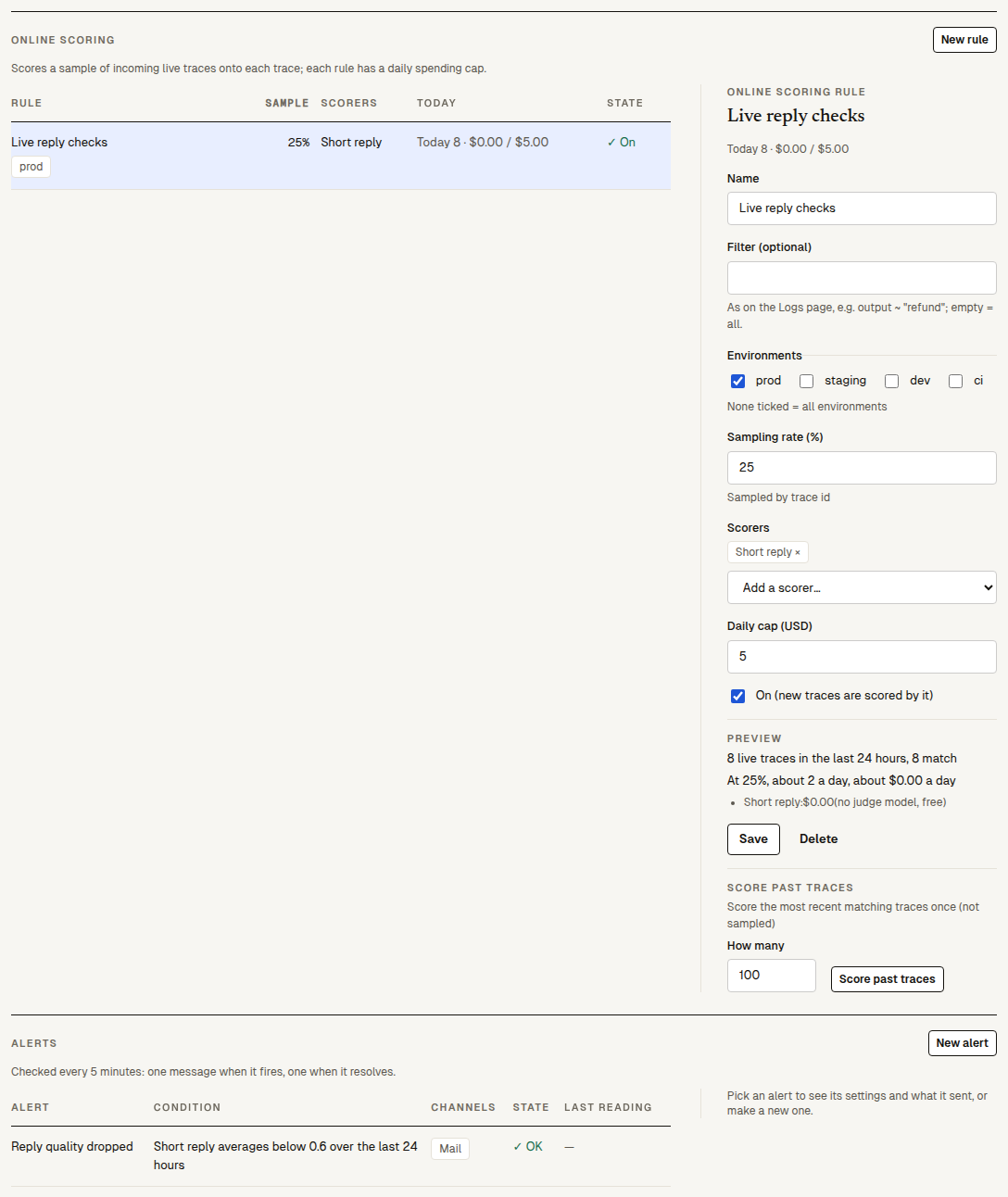
Online scoring rules
Click "New rule":
| Field | What it does |
|---|---|
| "Name" | The rule's name. |
| "Filter (optional)" | Which traces, in the filter language as on the Logs page, for example output ~ "refund" or tool = submit_claim. Empty means all. |
| "Environments" | prod, staging, dev, ci; none ticked means all. |
| "Sampling rate (%)" | 0 to 100 (10 by default). Sampled by trace id, so the same trace is always in or out. |
| "Scorers" | 1 to 10, from "This project" or the "Built-in library": LLM judges, code, rules and trajectory scorers (not human or agent-behaviour ones). The library offers only the built-ins that need no settings of their own; to score by your own criterion, words or length (Criterion, Contains, Length and the like), make a scorer with its settings under Scorers and pick it under "This project". |
| "Daily cap (USD)" | What the rule may spend on judging in a UTC day ($5 by default, $0.01 to $10,000). At the cap it stops until 00:00 UTC and says when it got there. |
| "On (new traces are scored by it)" | Off keeps the rule without scoring. |
- Preview reads the last 24 hours: how many traces there were, how many match (not counting ones cancelled by their caller), how many a day the sampling would score, and about what that costs a day per scorer (from this week's real cost, or an estimate of about 2,000 input and 300 output tokens per judge call; rules and code cost nothing).
- "Score past traces (try out / backfill)", in a saved rule, scores the most recent matching traces once each, without sampling (100 by default, up to 1,000; ones cancelled by their caller are passed over and don't count toward the number), for a rule that is on and under its cap: to try out a new rule on traces already here, or fill in earlier ones.
- The rules table shows each rule's sample, scorers, and "Today": how many traces it scored and what it spent of its cap.
A trace is scored about half a minute after it arrives, once per scorer even when two rules share it. Traces of SDK Eval rows aren't scored online (their experiment scores them). Nor are traces cancelled by their caller (status = cancelled: the caller called the call off before it ended): they cost nothing and count toward no rule's sample, "Today" count or daily cap. Up to 20 rules per project. Only a person on the web can create, change or backfill a rule; the in-app assistant and a connected coding AI can't.
What it costs: each judge call is judge usage, at the judge model's list price plus 30% (pricing), counted against the rule's daily cap. A judge call that fails on the platform's side is retried and not charged. When the organization's credit is used up, scores that need the judge stay undecided.
Where online scores show
- On each trace in Logs ("Online scores"), as a column and a facet (
scorer < 0.5), and in filters:score.builtin:correctness < 0.5. - On Overview: "Live · last 7 days" with the task completion (or your main online score), cost per 1,000 runs, p95 latency and the error rate, each against the week before; and the score trend draws the online scores' daily means, with the experiments in that time as points.
Alerts
Click "New alert":
| "Alert when" | Settings |
|---|---|
| "An online score averages below" | The scorer, the "Window" ("The last hour" or "The last 24 hours") and the line (0 to 1) |
| "The error rate is above" | The window and the percentage (calls cancelled by the caller count neither way) |
| "A day of traces costs more than" | The amount in US dollars, over the last 24 hours |
| "A push or pull request experiment is blocked by the release gate" | — |
| "An online scoring rule reaches its daily cap" | The rule, or "Any" |
"Send to" (one to three):
- Mail to the "Recipients" you tick among the organization's members.
- Slack: an incoming webhook address. Once saved it is never shown in full again; leave the field empty to keep it.
- Webhook: an address. When you save, the page shows a signing secret once: keep it. Each call carries
x-preworld-signature: t=<seconds>,v1=<hex>, wherev1is the HMAC-SHA256 of<t>.<body>under that secret, andx-preworld-event: alert.firing,alert.resolvedoralert.test. "Make a new signing secret" replaces it. How to check the signature: alert webhooks.
Alerts are checked every 5 minutes. An alert sends one message when it starts firing and one when it resolves, never one every check; a window with nothing in it changes nothing. "Send a test" sends a test message now. "What it sent" lists the last 50 messages, each channel with whether it was delivered. Changing an alert's condition starts it afresh. Up to 50 alerts per project; only the organization's members, on the web, can see and change them (a project token can't).
Next steps
- Logs: read the traces behind a score.
- Human review: have people grade what online scoring flags.
- Issues: what the assistant finds in low-scoring traces.