Playground
The Playground runs prompts and models side by side over the same rows, scores every cell, and saves each column as an experiment. Use it to try a prompt change or a cheaper model before you ship it.
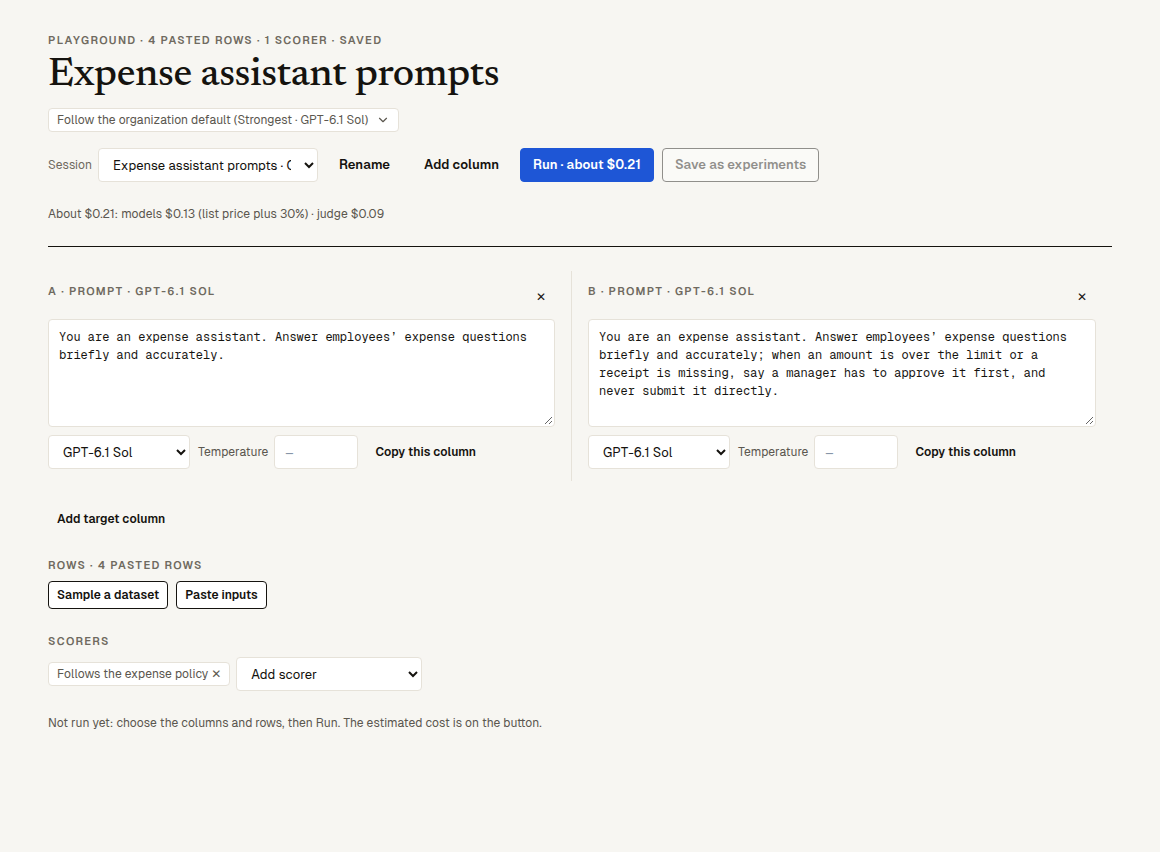
Open Playground in the project. It opens your latest session; "Session" switches between them and "+ New session" starts another. A session saves itself as you edit ("Saved").
Columns
Each column is one variant, lettered A to F (up to 6):
- A prompt column: a system prompt (up to 20,000 characters), a model of the platform (one not switched on for the organization is greyed out), and an optional "Temperature" (0 to 2; empty means the model's default). When the project declares tools, "Offer the model the project's N tools (calls recorded, never run)" lets the model call them: the calls are shown, nothing runs. "Add column" copies the last prompt column; "Copy this column" copies that one.
- A target column ("Add target column", one at most): the project's whole system as it runs today, in its sandbox, test runner or chat AI. It runs scenarios only, so it needs rows sampled from the project's Scenarios dataset, and it starts a real round, billed as any run. A project runs one test at a time, so while it runs it holds the project's test run: "Test new version" says the Playground is using it and waits until it ends.
Rows
- "Sample a dataset": pick the dataset, its version ("Current rows" or a saved one), "How many" (1 to 100, 10 by default) and a "Seed". The same seed draws the same rows.
- "Paste inputs": one input a line; a second part after a tab is the expected answer, as a spreadsheet copy gives it. Up to 100 rows.
- "Open in Playground" on an experiment row or a trace starts a session with that row, and that call's system prompt and model as column A.
Scorers
"Add scorer" picks from the project's scorers and the built-in library (not human or agent-behaviour ones), up to 20. Without scorers you see the outputs only; with them, every cell gets its scores, each column its mean, and each column after A a tally against A: "B beats A: 2 rows, loses 1, 1 tied". "Only differences" hides the rows where all columns agree.
Run
The primary button says what a run will cost, "Run · about $0.04", and the line under the columns breaks it down: the models at list price plus 30%, the judge for the scorers, and for a target column its sandbox runs (each row run 3 times under each of its conditions, as a test run is). Click it: cells fill in as they finish, four at a time. A cell that fails says why; one the platform's model failed on is retried and, if it still fails, not charged.
A target column's cell is its row in the round's experiment: the reply is the last attempt that replied, and each score is the mean of the attempts that decided it (two passes and one undecided read 1.00, not undecided), with a note saying how many times it ran. The scorers you chose read each attempt's reply and are folded the same way; an attempt with no reply isn't scored. Wins and means count a cell once it is done.
A run is a person's click: it is refused when the organization's credit is used up, as any run is (when tests can't start).
Save as experiments
"Save as experiments" makes each prompt column an experiment (source "Playground", target "Prompt"), the first one the baseline of the others; a target column links to its round's experiment. The page says it saved them and brings the links into view: each column's experiment, "B against A" (the comparison) and "Side by side". Clicking it again gives the same experiments back.
What it costs
Prompt cells are calls to the platform's models through the AI Gateway: billed by usage at list price plus 30%, and recorded as traces. Scorers are judge usage. A target column is a normal run. See pricing.
Next steps
- Experiments: compare the saved columns.
- Scorers: write the scorer that tells the variants apart.