Targets: how your agent connects
Targets in the project lists how your agent is connected now ("Connected") and every way to connect it ("Add target"). A project can use several at once: an SDK Eval in CI, the Gateway in production and a repository sandbox for release testing all land in the same experiments, logs and release gate.
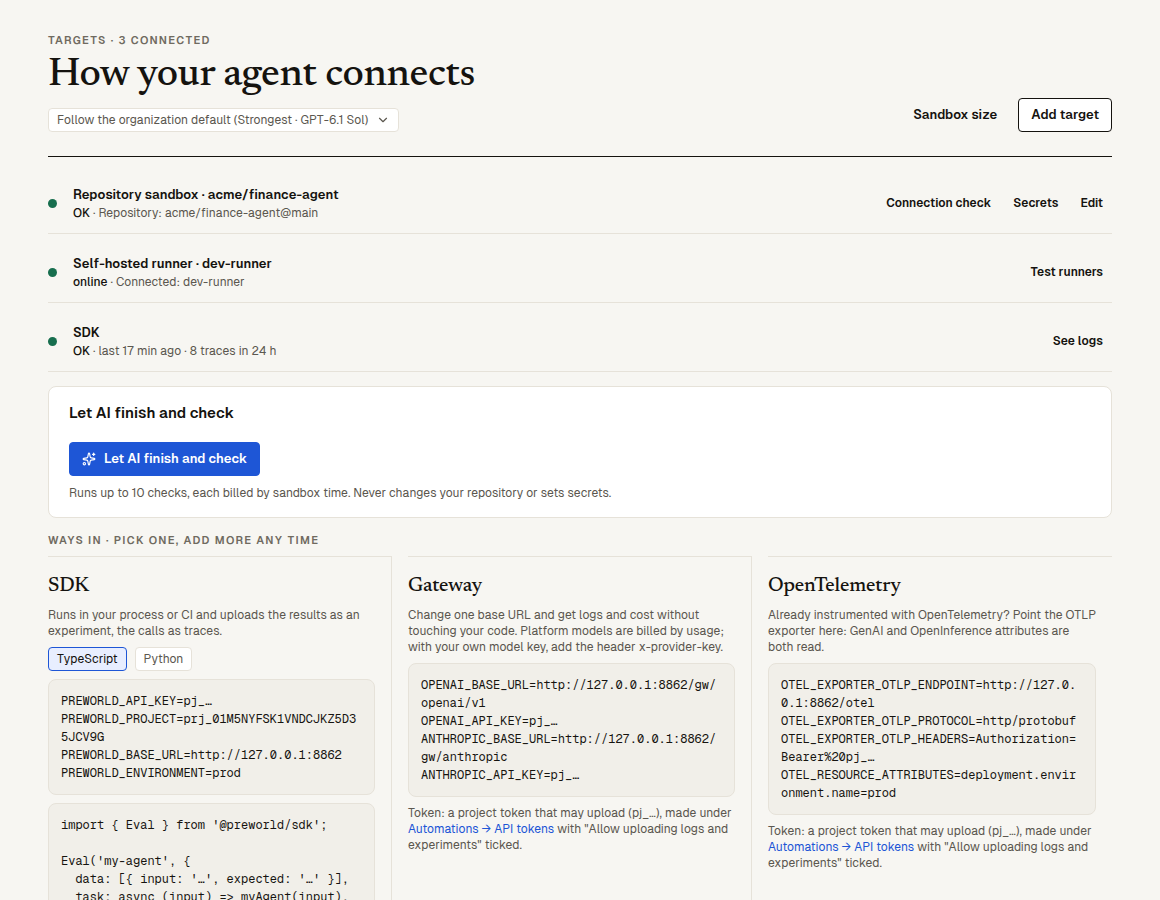
The ways in
| Way | For | Where your agent runs | What the platform sees |
|---|---|---|---|
| SDK (in development) | Evaluating from code, locally or in CI (quickstart) | Your process | What you upload: rows, outputs, your scores, traces of wrapped calls |
| Gateway (in development) | Logs and cost of model calls with no code change (quickstart) | Your app; calls go through the platform to the model | Each model call: request, reply, tokens, cost |
| OpenTelemetry | Apps already instrumented with OpenTelemetry (quickstart) | Your app | The spans your exporter sends |
| Repository sandbox (recommended for agents that call tools) | Agents that call tools and change data, with a test backend that starts with Docker Compose (quickstart, details) | A fresh virtual machine in our cloud (London by default), deleted after the run | Everything: replies, every tool call through the platform's proxy, the data afterwards; faults and attacks injected |
| Image sandbox (in development) | Agents already delivered as a container image (details) | The same | The same |
| Self-hosted runner | Agents that need your internal systems, or code that can't leave your company (details) | Your own machine, running reviewctl | The same, recorded on your machine; only results and evidence are uploaded |
| HTTP endpoint (in development) | Chat AIs tested on their replies only (details) | Your API, called by the platform | Replies |
The SDK, the Gateway, the image sandbox and the HTTP endpoint are in development: they show "In development" and can't be chosen yet; projects already connected that way keep working. The gateway's endpoints stay on, so a local test runner on a machine without an OpenAI key still calls models through them.
The OpenTelemetry card shows the lines to copy with your project's address and id, and so do the SDK and Gateway cards of a project already connected through them. All three use a project token that may upload: create one under Automations → API tokens with "Allow uploading logs and experiments" ticked.
How to choose
- You want to score outputs from your own code, in CI or on a laptop: the SDK (in development).
- You want to see production: OpenTelemetry (if you already export spans), or the Gateway (one base URL; in development).
- What matters is what the agent does, the tools it calls, the data it changes, how it behaves when a tool fails or a document tries to hijack it: the repository sandbox. Only it (and the self-hosted runner) can inject faults and attacks and read the data afterwards.
- The code can't leave your company, or the agent needs internal systems: the self-hosted runner.
Where your data goes with each way is in the data boundary table.
Connected
Each connected target has a row:
- Repository sandbox · owner/repo: "Connection check", "Secrets", "Edit".
- Image sandbox · image: "Connection check", "Edit".
- Self-hosted runner · its label: online or offline, and "Test runners" to pair, restart or revoke them.
- HTTP endpoint · its name: "Edit".
- SDK, Gateway, OpenTelemetry: "OK", or "nothing new in 24 h"; when the last one arrived, and how many traces and experiments came in 24 hours. "See logs" opens Logs on that source, and "See experiments" the experiments.
"Sandbox size" (top right) opens Settings → Sandbox for a repository or image project.
Connection check
For a sandbox or a self-hosted runner, the "Connection check" block shows the latest pre-run: whether the test reached the agent, each check with ✓ or ✗, and "Open this check" for its phases and log. "Pre-run" starts one from the "Test new version" form; "Check once" in the repository's wizard does the same. A run pre-runs by itself first, so you don't have to. When a check fails on a repository project, the platform's AI fixes the test connection and checks again (how).
Next steps
- Quickstart: the three ways in, step by step.
- review.yaml reference: how a sandbox or runner starts and tests your agent.
- OpenTelemetry and the AI Gateway: endpoints, headers, billing.